
Linux Lite Is a Free, Lightweight Linux Distro for Old PCs and New Users
Linux Lite is a free, open-source Linux distribution that turns an old, slow computer into a fast, useful one again. It is built on Ubuntu LTS, uses the lightweight Xfce desktop, and is made for people who are new to Linux — especially Windows users who want a familiar desktop without buying new hardware.
Download Linux Lite free, try it from a USB stick without installing anything, and install it in under 20 minutes.
The official download link will be added here shortly.
- Ubuntu 26.04.1 LTS
- Xfce desktop
- 64-bit only
- ISO, about 2.4 GB
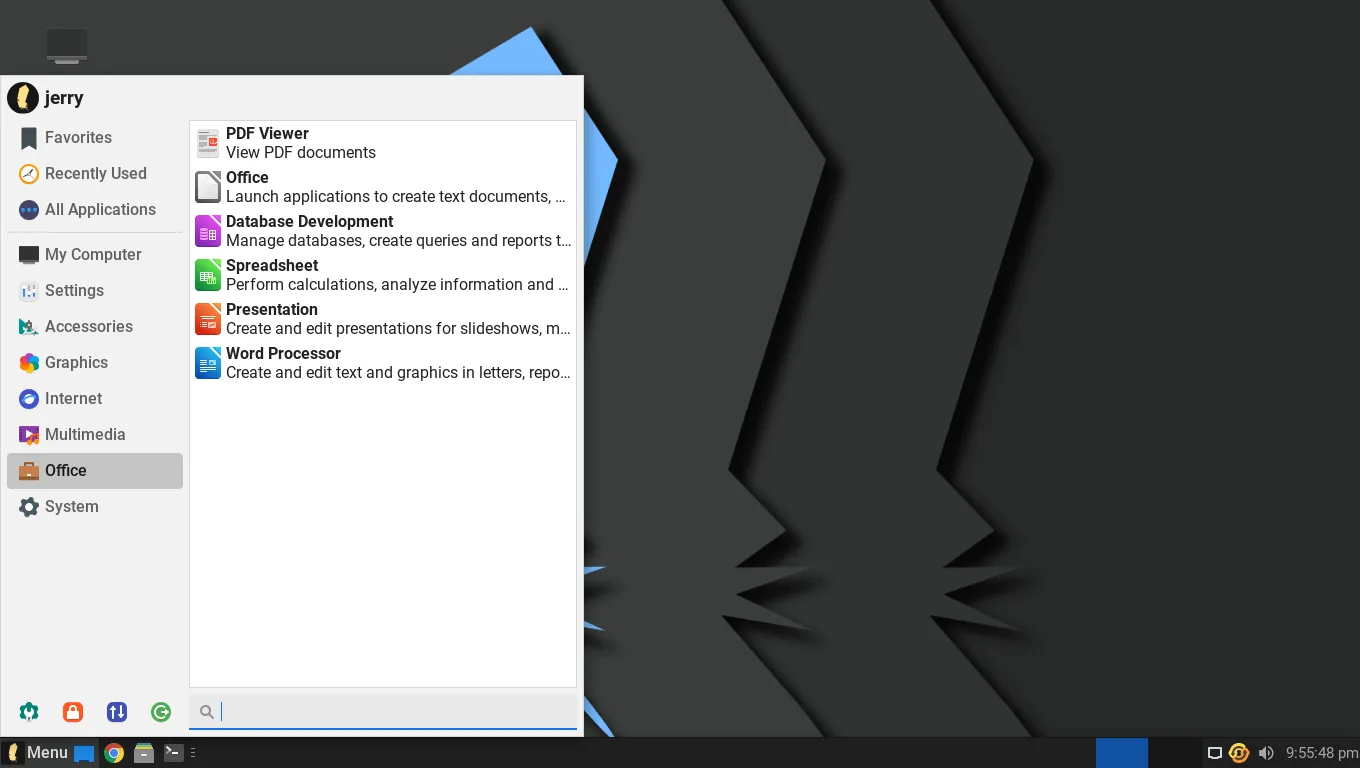
The Linux Lite start menu. Screenshot from the Linux Lite Help Manual (GPL-2.0).

What Is Linux Lite?
Linux Lite is a lightweight Linux distribution based on Ubuntu LTS (Long Term Support). It uses the Xfce desktop environment and comes with a full set of everyday applications already installed, so it is ready to use the moment it boots.
It was created to show people just how easy Linux can be, and to give older computers a second life. The project is led by Jerry Bezencon, started in October 2012, and has now been developed for 14 years, with more than 18 million downloads.
"Lite" here does not mean a stripped-down system. Linux Lite ships the full LibreOffice office suite, Firefox, GIMP and VLC — not cut-down replacements. The "lite" part is Linux made light and easy: a familiar desktop, simple tools, and no bloat.
What's New in Linux Lite 8.2
The latest version is Linux Lite 8.2 Final, released on 31 October 2026. It is built on Ubuntu 26.04.1 LTS (codenamed Resolute), uses Xfce with the LightDM login screen, carries the codename Hematite, and runs the Linux 7.3 kernel from the project's own Advanced Performance Kernels.
Series 8 was the biggest rebuild in the project's history. Linux Lite 8.0, released on 1 June 2026, replaced the old installer with Calamares, made Firefox the default browser, removed Snap and Flatpak, and added a Lite Game Center and a local AI assistant called MyAI. Fifteen in-house applications were rewritten, the whole desktop was translated into 22 languages, and the ISO was slimmed to 2.36 GB.
Version 8.2 keeps that foundation and adds two custom Linux 7.3 kernels: a desktop kernel for everyday use and a gaming kernel that reduces input lag for games and audio work.
A Brief History of Linux Lite
Linux Lite began in 2012 as a fork of Ubuntu, with one goal: a "lite" version that is easy to use and light on resources. The first release was version 1.0, codenamed Amethyst.
It has followed Ubuntu's LTS cycle ever since, which means long-term support and security updates with every major release. Version 7.8 was based on Ubuntu 24.04 LTS; Series 8 moved the project to Ubuntu 26.04 LTS.
Key Features
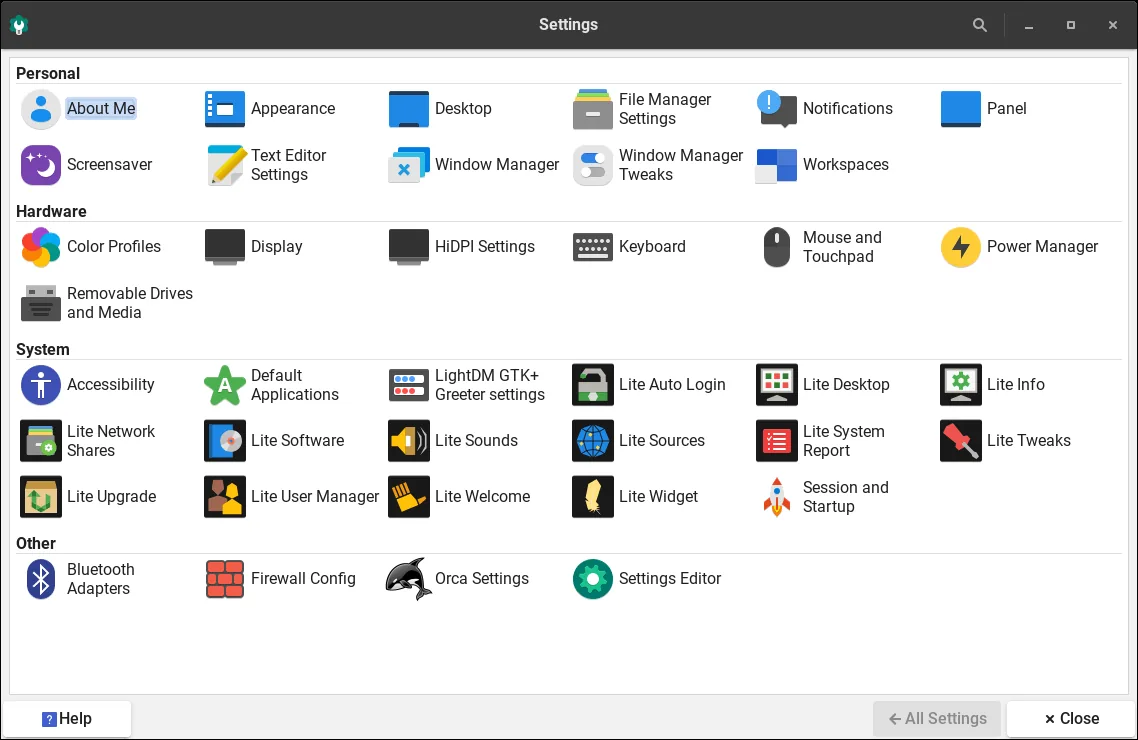
Linux Lite is built around balance: powerful enough for daily work, light enough for old hardware. Its main features are the Xfce desktop, the Ubuntu LTS base, a complete set of pre-installed applications, and its own Lite tools that handle updates, drivers, software and tweaks with big friendly buttons.
It boots fast, runs well on older CPUs and limited RAM, and supports multiple monitors and high-resolution displays. You can try it from a live USB before installing, and if you already run Linux Lite 7.x, you can upgrade in place to Series 8 without reinstalling.
For games, the Lite Game Center installs Steam, Lutris, Proton and Wine in one click, and the optional gaming kernel is tuned for low latency. MyAI is a private, local AI assistant that runs entirely on your own computer — no cloud account, no telemetry — and it can be removed completely if you do not want it.
System Requirements
These are the current official Linux Lite system requirements (the minimum for a usable desktop):
Linux Lite is 64-bit only, and there is no official ARM version. A machine with 2 GB of RAM can run it in a pinch, but 4 GB is what makes multitasking comfortable. Machines with under 1 GB of RAM are not a good fit — lighter systems exist for those.
Requirements have grown as the distro has grown. In 2016, Linux Lite asked for a 700 MHz processor and 512 MB of RAM. The current figures reflect a fuller, more modern desktop.
Download Linux Lite
The Linux Lite download is free. Get the latest 64-bit ISO, about 2.4 GB, from the official site at linuxliteos.com and its mirrors. Always download from the official site, and check the file's checksum before you use it.
The official download link will be added here shortly.
- Version
- 8.2
- Released
- 31 October 2026
- Based on
- Ubuntu 26.04.1 LTS
- Desktop
- Xfce
- Architecture
- 64-bit only
- File
- ISO, about 2.4 GB
How to Install Linux Lite
Installing Linux Lite is straightforward, even if you have never installed Linux before. The whole process takes under 20 minutes, and under 10 minutes on an SSD.
Download the ISO from the official site and check its checksum.
Make a bootable USB stick with Rufus or Etcher (both run on Windows 10 and 11), or mount the ISO in a virtual machine.
Boot from the USB and try the live session first — nothing is installed until you choose to install.
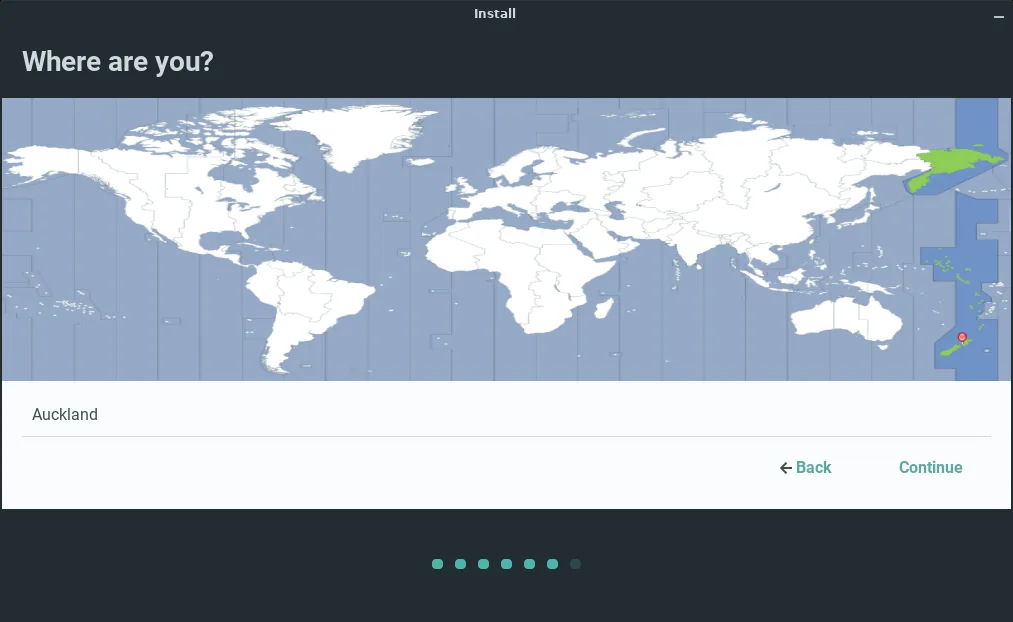
Click "Install Linux Lite" and pick your language, timezone and keyboard layout.
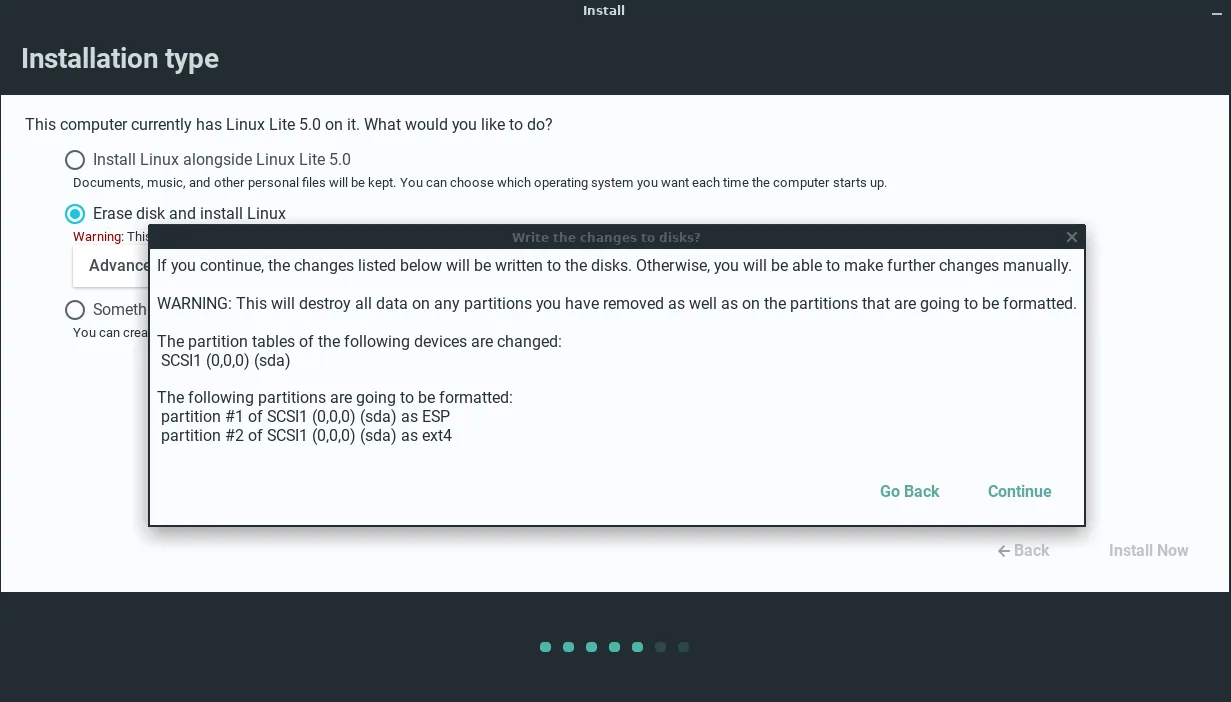
Choose how to use the disk: erase it, install alongside another operating system, or partition it manually. For dual-boot with Windows, pick "alongside".
Set your username, password and timezone, and choose whether to log in automatically.
Reboot, then run Lite Updates to get the latest patches.
Before you install, back up your files, and disable Secure Boot in your computer's BIOS settings — Linux Lite does not support Secure Boot, and the installer will ask for it to be off.


First Boot: What You See
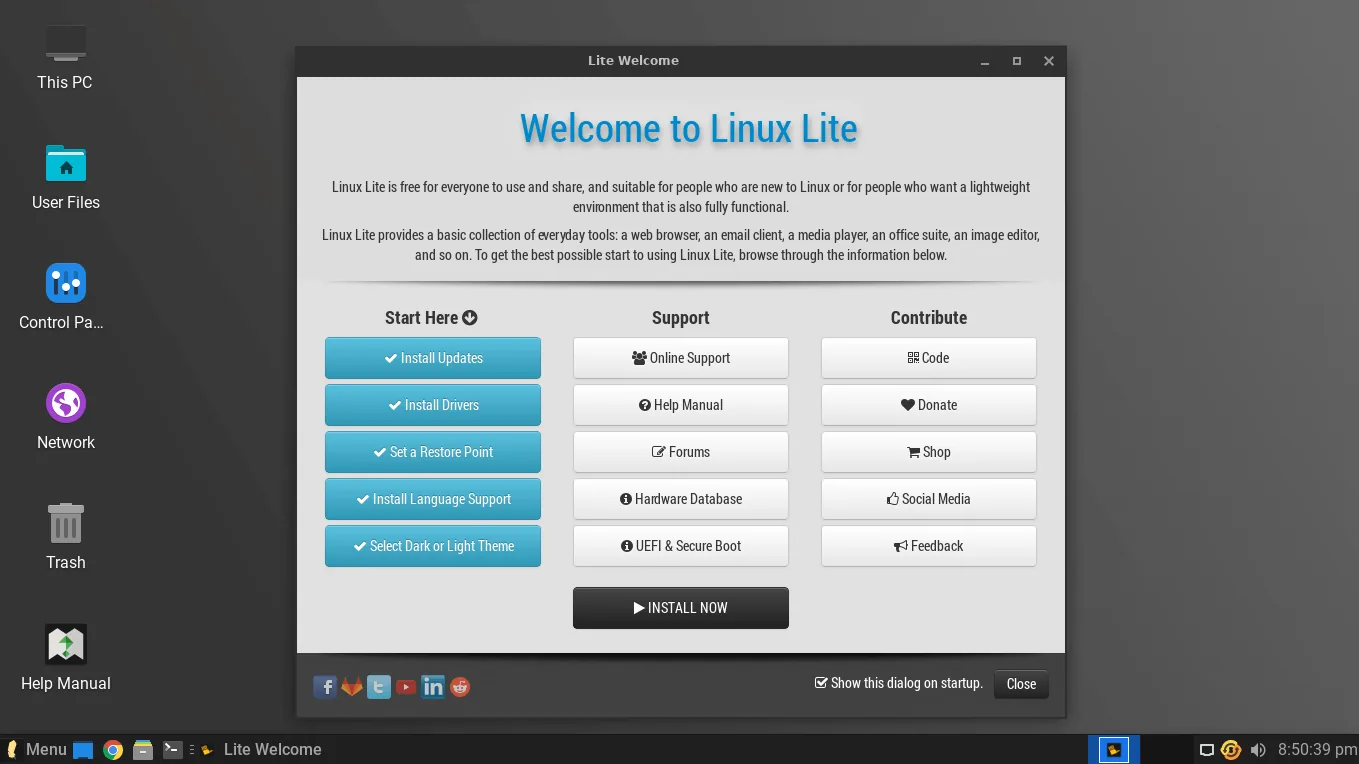
When Linux Lite starts for the first time, the Lite Welcome app opens and walks you through the first steps: install updates and drivers, then set up the rest of the system. It is a guided checklist, and it is the first thing most reviewers praise.
The desktop itself looks familiar from the start: a taskbar at the bottom, a start menu, a system tray and a clock. A Help Manual icon sits on the desktop and opens a local guide that covers every part of using Linux Lite.

The Desktop: Familiar by Design
Linux Lite uses the Xfce desktop, dressed with Papirus icons, the Roboto font and a clean, modern theme. The layout is deliberately close to Windows: a bottom taskbar, a start menu, desktop icons that work out of the box, and a system tray.
Xfce is also easy to make your own. You can move panels, add widgets, change window behaviour and set keyboard shortcuts without editing configuration files. The desktop stays light through all of this, so you get a familiar, polished desktop that does not slow the machine down.

Applications Included
Linux Lite comes with everything most people need, already installed: Firefox for the web, Thunderbird for email, LibreOffice for documents, spreadsheets and presentations, VLC for media, GIMP for image editing, the Thunar file manager, and Timeshift for system backups.
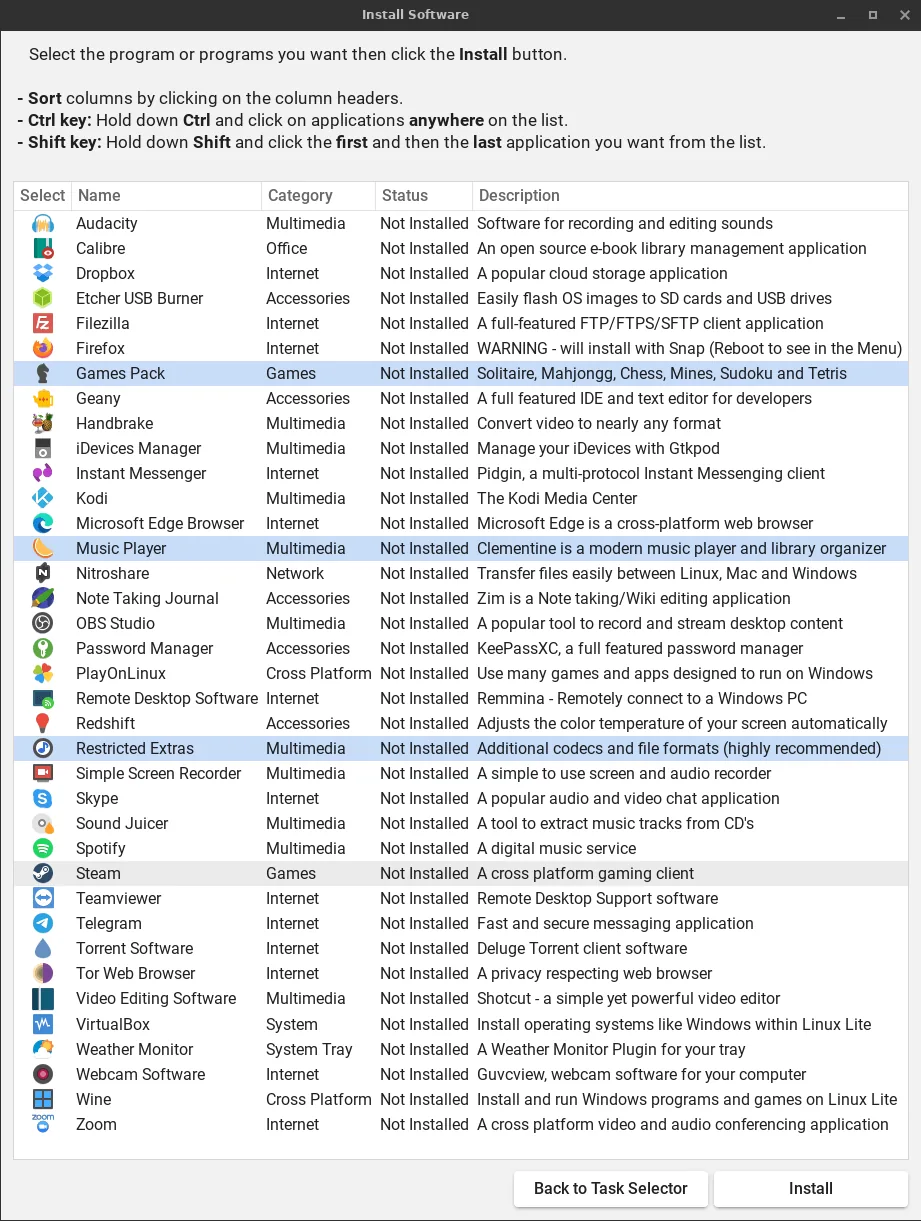
Thousands more applications are available from the Ubuntu repositories through Lite Software, the project's own app store. Linux Lite ships DEB packages first and deliberately leaves out Snap and Flatpak, so applications start fast and do not carry duplicate runtimes.

Lite Tools: The Built-In Helpers
The Lite tools are what set Linux Lite apart from other lightweight distros. They are small, single-purpose applications that do common jobs with one click:
Performance: How Light Is It Really?
In independent testing on a 2014 laptop (Intel i5, 8 GB RAM, SSD), Linux Lite 8.0 used about 650 MB of RAM at idle, booted in about 18 seconds, used 1–2% of the CPU at idle, and took about 12 GB of disk space after installation.
Older versions idled lower — around 400–600 MB — because they shipped fewer applications. The current version trades a little idle memory for a much fuller desktop, and its BORE scheduler keeps the system feeling snappy while you are actually using it, even if the idle numbers are higher than the lightest rivals.
On a 2 GB machine, Linux Lite runs but feels tight as soon as you open a second application. That is the real limit: it is light, but it is a complete desktop, not a bare one.
RAM used at idle
Linux Lite vs Lubuntu (and Other Distros)
Lubuntu is Linux Lite's closest rival. Both are built on Ubuntu 26.04, both are free, and both target old hardware — but they take different paths.
| Linux Lite 8.2 | Lubuntu 26.04 LTS | |
|---|---|---|
| Desktop | Xfce 4.20 | LXQt 2.3 |
| RAM recommended | 4 GB | 2 GB comfortable |
| Storage | 40 GB | 20 GB |
| ISO size | about 2.4 GB | about 2.7 GB |
| Installer | Calamares | Calamares |
| Default browser | Firefox | Firefox (Snap) |
| Secure Boot | Not supported | Supported |
| Support until | Ubuntu LTS cycle | April 2029 |
Lubuntu idles lighter — around 480 MB of RAM — and is the better pick for a 2 GB netbook or a 2009–2011 laptop. Linux Lite wins on onboarding, with the Welcome app, the Lite tools, the Game Center and a fuller set of pre-installed applications, and it is the better pick for a 4 GB laptop and a first-time Linux user.
Against the others: Ubuntu is more feature-rich but heavier on the same base; Linux Mint is more polished but heavier; Xubuntu shares the Xfce desktop but has fewer of the custom tools; Zorin OS Lite looks more like Windows but is a little heavier. On the same old hardware, Linux Lite runs faster and more securely than Windows 10 — and Windows 11 will not install on many of these machines at all, because it needs a TPM chip and 4 GB of RAM.
Who Is Linux Lite For?
Linux Lite is for Windows users who want to switch to Linux without relearning everything, and for people trying Linux for the first time. It is a lightweight OS for old PCs and laptops that Windows 11 has left behind, for schools and educational labs that need reliable, fast machines, and for anyone who wants a clean, minimalist workstation.
It also works well as a virtual machine guest and in a homelab, where its small footprint means each virtual machine needs very little RAM and disk. And it makes a good secondary or backup machine for a home or a small business.
Pros and Cons
Pros
- Free forever
- Extremely fast on old hardware
- A familiar, Windows-like interface
- A complete set of applications out of the box
- The Lite tools remove most of the usual Linux friction
- Regular security updates from Ubuntu LTS
- A strong, friendly community
- In-place upgrades from 7.x to 8.x
Cons
- It needs 4 GB of RAM for a comfortable experience, so it is not the lightest choice for a 2 GB machine
- Secure Boot must be disabled before installing
- There is no official ARM version, so it runs on x86/64 PCs only
- The built-in firewall is off by default and must be switched on
- Power users may find it "too simple" out of the box
Community and Support
Linux Lite has an active, welcoming community. Its forums have been viewed more than 91 million times, the built-in Help Manual covers the system from installation to tweaks, and there is a Discord server for real-time help. The documentation is written for people who have never seen Linux before, which is why first-time users keep recommending it.

FAQs
Is Linux Lite good for very old hardware?
Yes — it is made for it. A 10-year-old laptop runs well on it, and it is at its best on machines with 4 GB of RAM. On 2 GB it works but feels tight, and machines with under 1 GB of RAM need an even lighter system.
Is Linux Lite good for beginners?
Yes. It was designed for people who have never used Linux: a familiar layout, a guided Welcome app, a full set of applications, and documentation written in plain language.
Is Linux Lite free?
Yes. It is free and open source, free to download, free to use, and free to share.
Can I upgrade from Linux Lite 7.x to 8.x?
Yes. Use the Lite Upgrade tool for an in-place upgrade. Back up your system with Timeshift first; the upgrade takes 30 minutes to 2 hours depending on your connection and hardware.
Does Linux Lite support Secure Boot?
No. Secure Boot must be disabled in your computer's BIOS settings before you install Linux Lite.
Can I use Linux Lite for professional work?
Yes. It comes with LibreOffice, Thunderbird, GIMP and VLC already installed, and it can run almost all software that runs on Linux.
Is Linux Lite secure and regularly updated?
Yes. It is built on Ubuntu LTS, so it gets regular security and software updates, and it has a built-in firewall — just remember to switch it on, because it is off by default.
Is Linux Lite lighter than Lubuntu?
No — Lubuntu idles lighter, at around 480 MB of RAM against Linux Lite's roughly 650 MB. Linux Lite trades that extra memory for a fuller desktop, more pre-installed applications, and the Lite tools.
Can I remove MyAI if I do not want it?
Yes. Run sudo apt purge myai and delete the Firefox bookmark, and it is gone completely.
Linux Lite 8.2
Linux Lite does not try to impress with visual effects. It is a plain, fast desktop for older hardware, for beginners, and for anyone who wants a computer that starts quickly and does the everyday jobs without fuss.
Download it free, try it from a USB stick, and put your old PC back to work.
The official download link will be added here shortly.